
Make sure to send the IP-address of your GT7 to support@incaps.se before starting these instructions.
Written Instructions
Unpack the Sesame Edge and connect it to network by ethernet cable and then connect and turn on the power. The Sesame Edge expects to get an IP address during startup through DHCP.
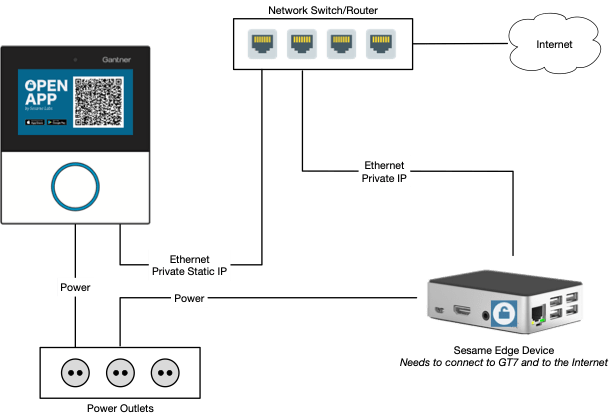
- Sesame Edge needs to be able to communicate out on the Internet
- Sesame Edge needs to be able to communicate with the GT7
- You need to activate QR code mode API in the GT7 admin interface
- Set the pixel size to 200 for optimal performance
Sesame Open App

iOS: https://apps.apple.com/se/app/sesame-open-app/id1531521046
Android: https://play.google.com/store/apps/details?id=se.incaps.sesameopenapp
Please contact support@incaps.se for login credentials.
Demo Instructions
Let the users scan the QR code with their mobile phone camera. They will open a website in their browser that will unlock the GT7.

You can show them how the functionality works in the app, or they can download the app themselves on the appstore and login with the trade show login.
Mobile network setup for faster response time
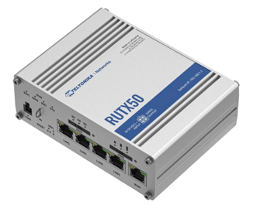
Recommended Mobile Router and Antenna used by customer at site for faster response times
RUTX50 Industrial 5G Router
https://teltonika-networks.com/products/routers/rutx50
OMNI-214
Omni-directional, 4X4 MIMO 5G/LTE antenna
https://poynting.tech/antennas/omni-214/

 INCAPS